
- Go to https://challenge.bebrasnamibia.com/admin, enter your userid and password and login
- Click on "Students"
- "New"
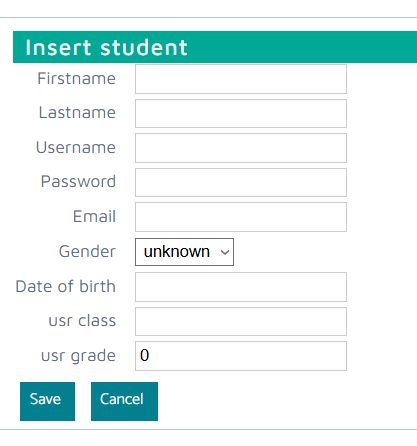
- Enter the following information:
- Firstname and Lastname: they will appear on the certificate
- Username: this username has to be unique in the system, best practice is to use a short name for the school, followed a combination first- and lastname. If left empty, the system will automatically create a username when saving this new student
- Password: If left empty, the system will automatically create one when saving this new student. This password is needed to login for the Bebras Challenge.
- Usr Class: this field can be used for your internal coordination as you will be able to filter for this field
- Usr Grade: this is important for the participation at the Bebras Challenge, please use the grade the student is in when this years Bebras Challenge takes place
- Click on "Save"
Downloading learners records BEFORE the Bebras Challenge:
- It is important to download a list with the learners userid's and passwords BEFORE the Bebras Challenge as the learners will need them to login and participate
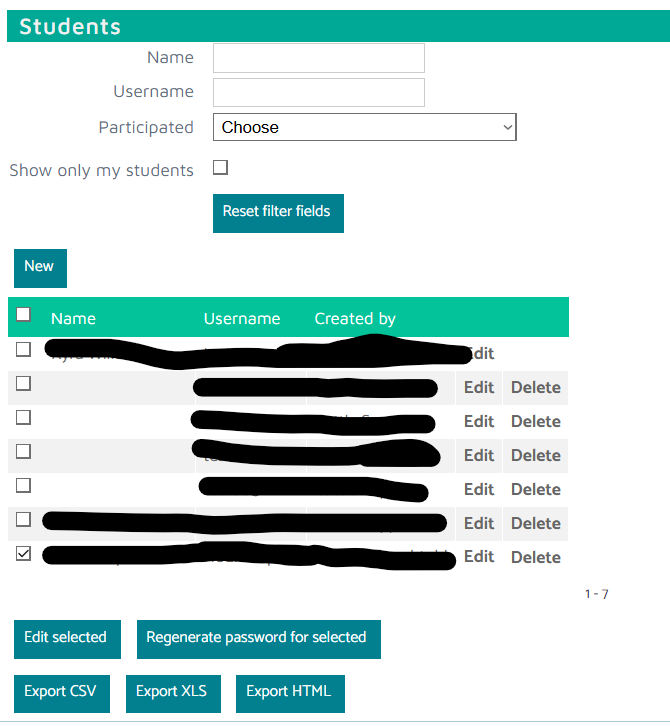
- Click on "Export CSV" or "Export XLS" or "Export HTML" to download a list in the respective format